How to Submit Your Website to Yahoo: A Step-by-Step Guide
A step-by-step guide to submitting your site to Yahoo Search via Bing Webmaster Tools. Learn how to verify site ownership and submit your XML sitemap for faster indexing.

Yahoo no longer runs its own webmaster tool. Yahoo Search is powered by Bing's index, so to add your site to Yahoo and appear in Yahoo Search results, you need to register with Bing Webmaster Tools at bing.com/webmasters/home. The whole process takes about 10-15 minutes.
Why there is no separate Yahoo Webmaster Tools
Yahoo shut down its web directory in 2014. Since then, Yahoo search results have been powered by Bing's index. Yahoo's official help documentation confirms this: to get your site into Yahoo Search, you must use Bing.
There is no standalone "Yahoo Webmaster Tools" anymore. Bing Webmaster Tools offers faster indexing, search query stats, and crawl error data-all for free.
What you'll need before you start
- A Microsoft account (outlook.com, hotmail.com, work/school account) or a Google/Facebook account. Bing Webmaster Tools supports signing in with these.
- Your website URL in the
https://example.comformat (including the protocol). - Access to your server files or domain DNS records for verification. For WordPress, Tilda, and most website builders, access to the theme/template settings is enough.
Step 1. Sign in to Bing Webmaster Tools
Go to bing.com/webmasters/home and click Sign in. You can sign in using three options:
- Microsoft account: log in using outlook.com, hotmail.com, or a corporate account.
- Google account: click Sign in with Google on the homepage and authenticate with Gmail.
- Facebook: sign in using your Facebook account.
If you don't have any of these, you can create a Microsoft account at account.microsoft.com. It's free and takes just 2-3 minutes.
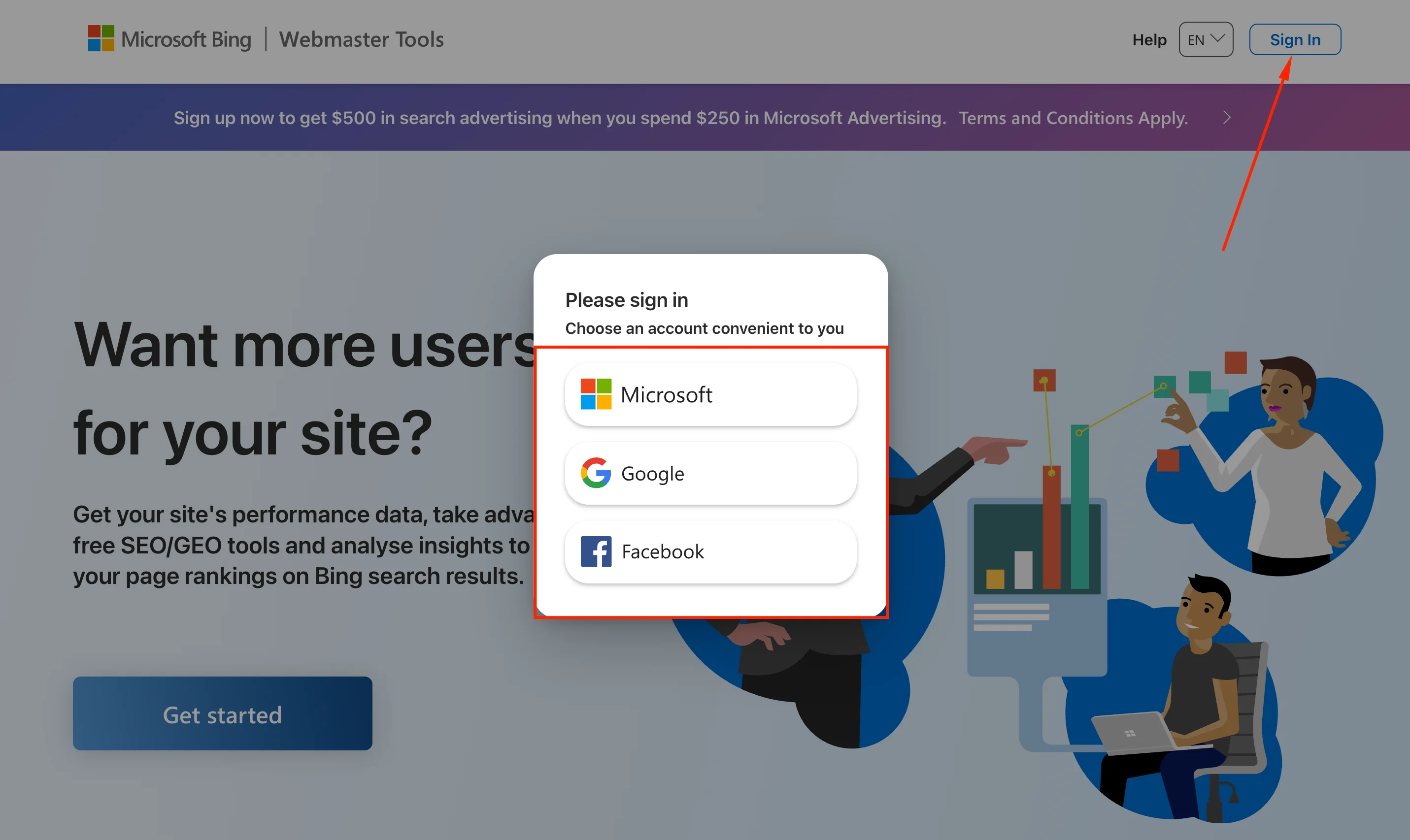 Screenshot: Bing Webmaster Tools sign-in page with Microsoft, Google, and Facebook buttons
Step 2. Add your site
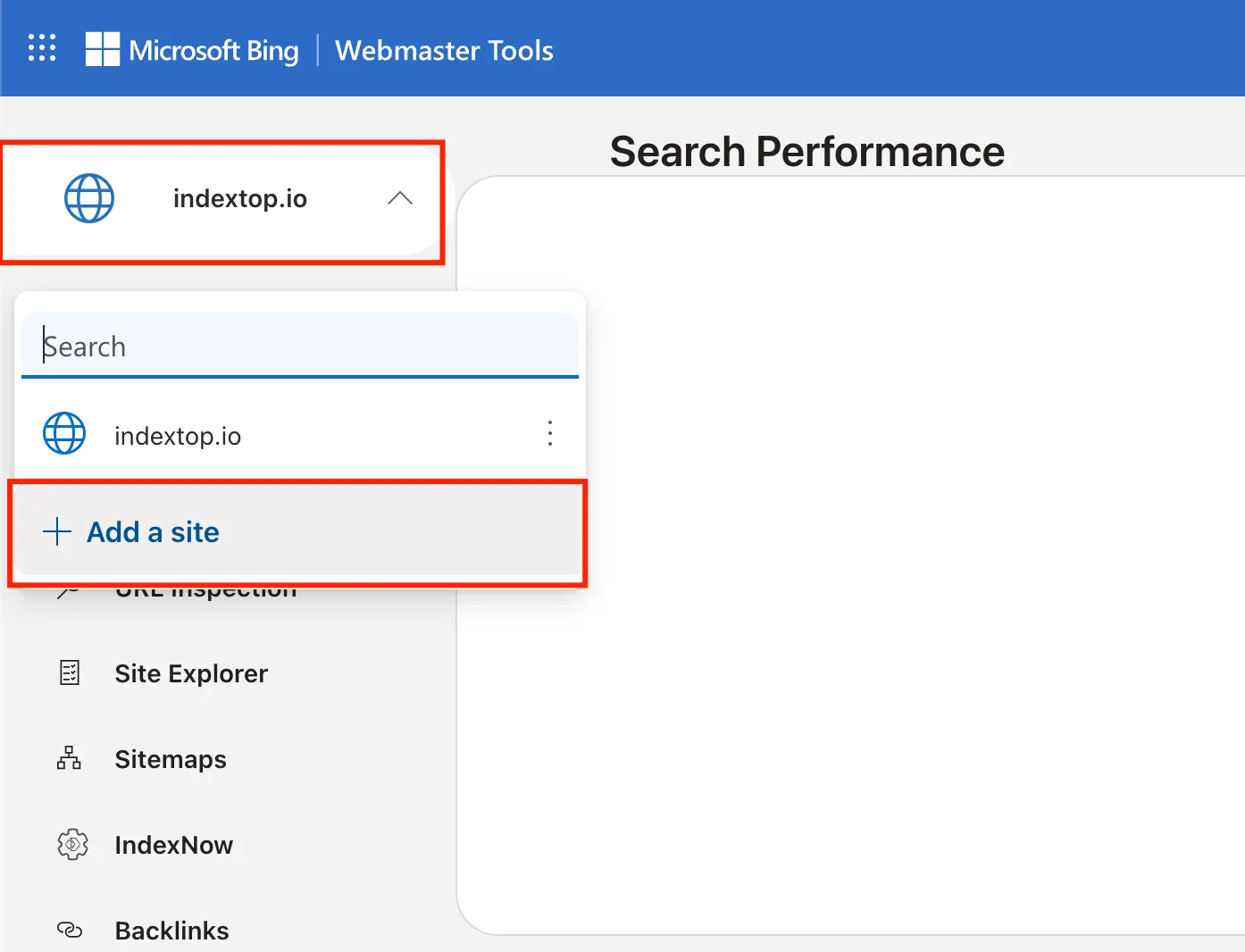
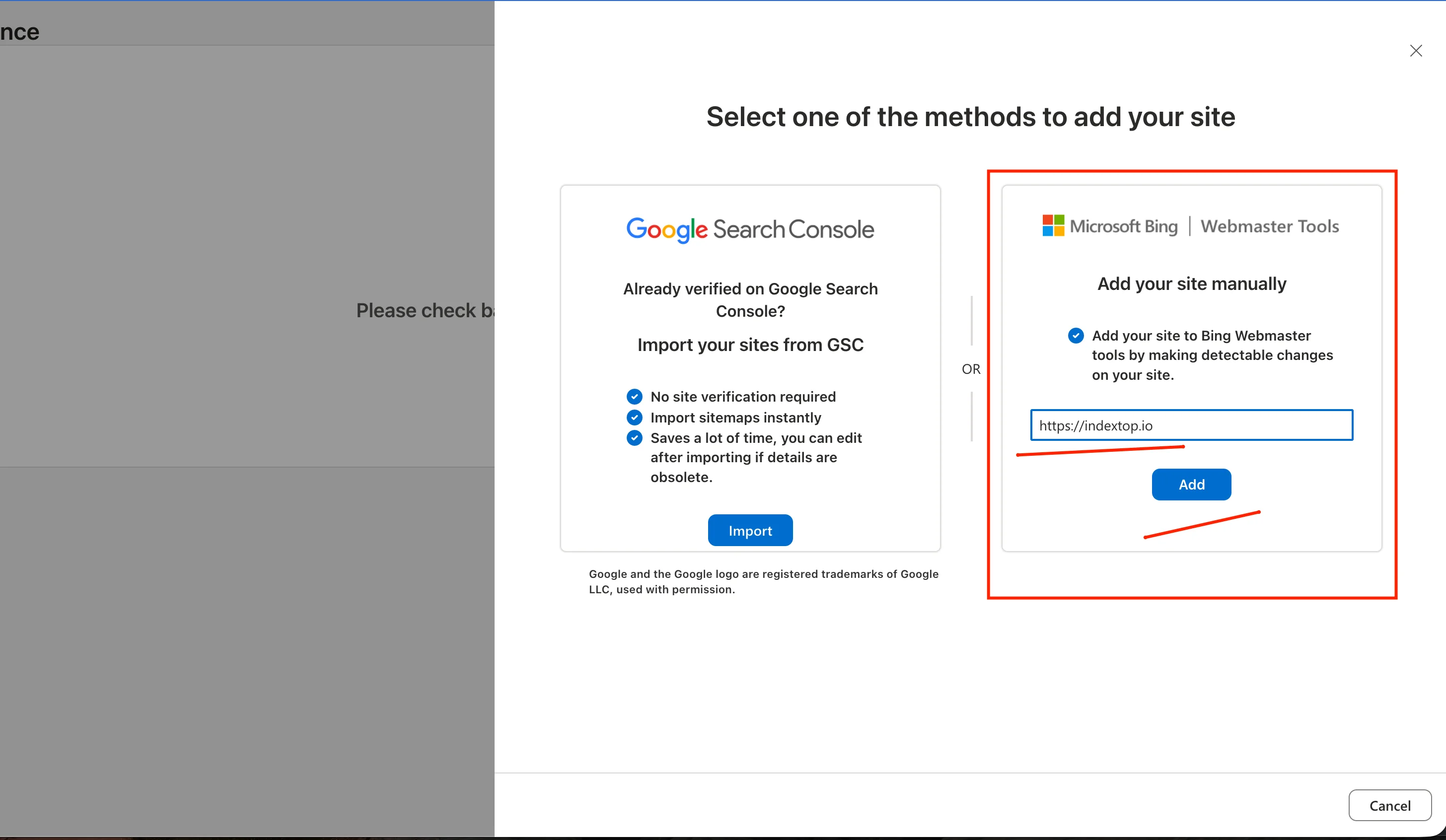
Once signed in, click Add a site in the left sidebar or the center of the dashboard. Enter your full URL (e.g., https://example.com) and click Add.
Step 3. Verify site ownership
Bing offers three verification methods.
XML file. Download BingSiteAuth.xml, upload it to your site's root directory so it is accessible at https://example.com/BingSiteAuth.xml, then click Verify.
HTML Meta tag. Paste the provided meta tag into the <head> section of your homepage. This is ideal if you can edit your site's header template.
CNAME record. Add a CNAME record to your domain's DNS settings. Since DNS propagation can take up to 24 hours, this is the slowest verification method.
In practice, the XML file method is the fastest: just upload, click Verify, and you're done.
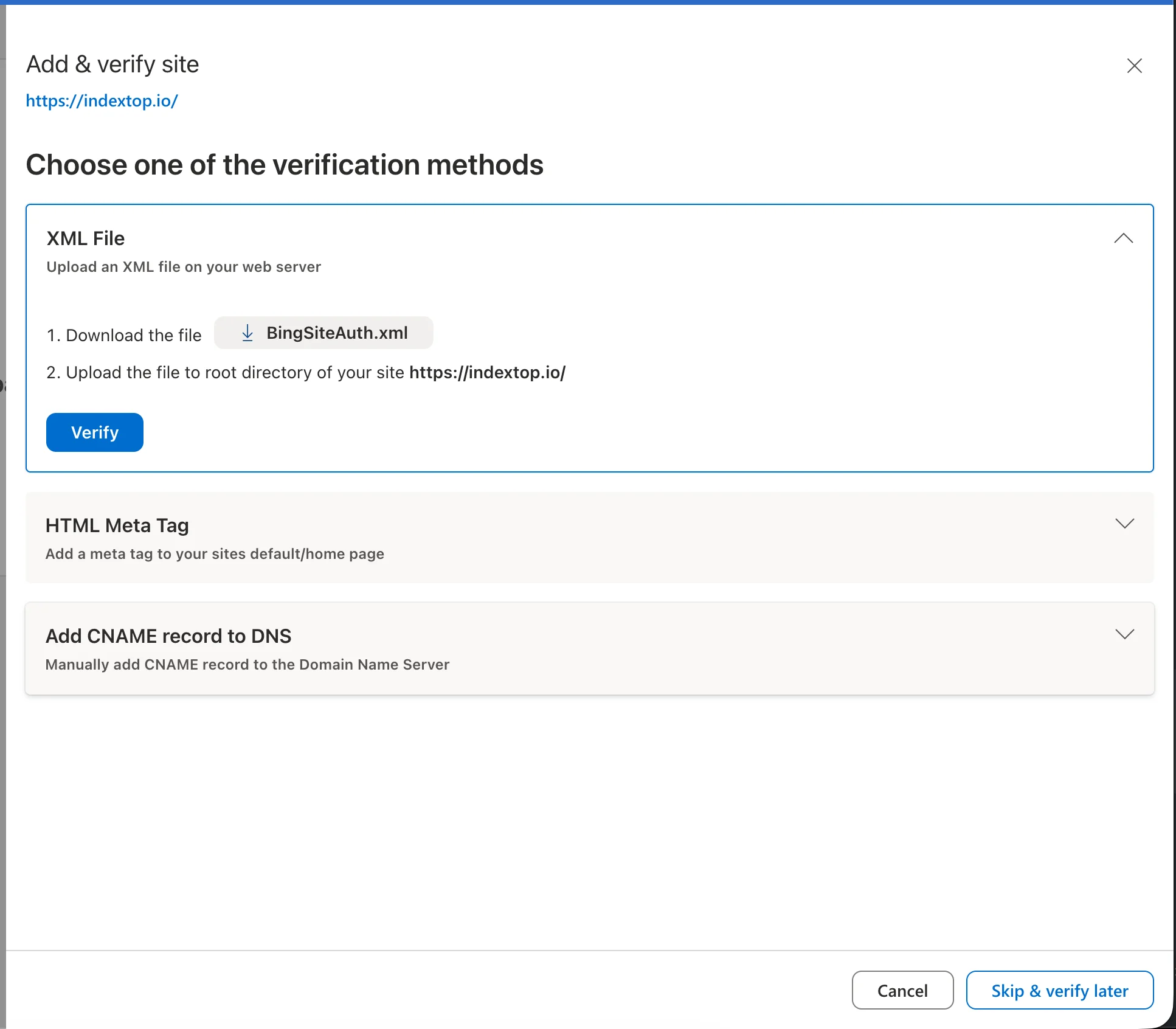 Screenshot: Verification screen showing the three options
Step 4. Submit your sitemap
Once verified, navigate to the Sitemaps section in the left sidebar. Enter your XML sitemap URL (e.g., https://example.com/sitemap.xml) and click Submit.
If you don't have a sitemap yet: on WordPress, plugins like Yoast SEO or Rank Math generate one automatically. Most other CMS platforms generate sitemaps by default.
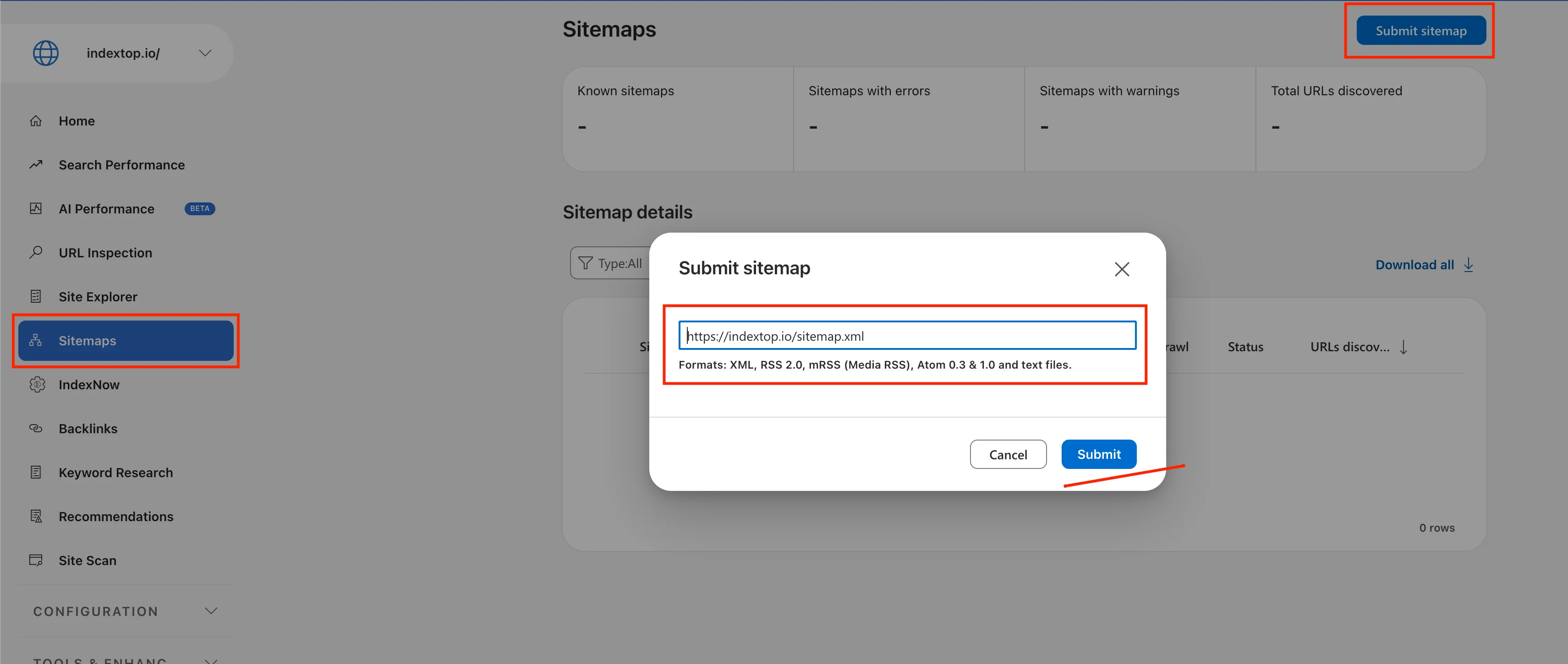 Screenshot: Sitemaps section with the URL input field
Step 5. Speed up indexing for specific pages
While submitting a sitemap covers your entire site, you can request immediate indexing for specific pages using the URL Inspection tool:
- Go to URL Inspection in the left sidebar.
- Paste the URL of the page you want to index into the search bar.
- Click Request Indexing.
Bing will prioritize crawling this page, which is much faster than waiting for it to be discovered via your sitemap.
Frequently Asked Questions
Do I need to register my site with Yahoo separately?
How long does indexing take?
Can I import data from Google Search Console?
What should I do if verification fails?
BingSiteAuth.xml is accessible directly, without redirects or authentication. A common issue is when a site redirects all incoming traffic to a login page.Is it free?
Does this work for subdomains?
https://blog.example.com.Summary
Adding your site to Yahoo Search simply means registering it with Bing Webmaster Tools. The process boils down to three steps: sign in with a Microsoft or Google account, add your URL, and verify ownership using an XML file. Once verified, your site will be indexed by both Bing and Yahoo. To speed up indexing for specific pages, use URL Inspection → Request Indexing.
Read also

How to Install Google Analytics on Your Website: A Step-by-Step Guide
A step-by-step guide to setting up Google Analytics 4 on your website. Learn how to create an account, configure a data stream, and install the code without any coding skills.

How to Add Your Site to Yandex Webmaster and the Search Index: A Step-by-Step Guide
Step-by-step guide to adding your website to Yandex Webmaster. Learn how to verify domain ownership using four different methods and successfully get your pages indexed.